> ## Documentation Index
> Fetch the complete documentation index at: https://docs.ag2.ai/llms.txt
> Use this file to discover all available pages before exploring further.

# Real-Time Voice Interactions over WebRTC

<div>
  <img noZoom className="social-share-img" src="https://media.githubusercontent.com/media/ag2ai/ag2/refs/heads/main/website/static/img/cover.png" alt="social preview" style={{ position: 'absolute', left: '-9999px' }} />
</div>

<div class="blog-authors">
  <p class="authors">Authors:</p>

  <CardGroup cols={2}>
    <Card href="https://github.com/marklysze">
      <div class="col card">
        <div class="img-placeholder">
          <img noZoom src="https://github.com/marklysze.png" />
        </div>

        <div>
          <p class="name">Mark Sze</p>
          <p>Software Engineer at AG2.ai</p>
        </div>
      </div>
    </Card>

    <Card href="https://github.com/sternakt">
      <div class="col card">
        <div class="img-placeholder">
          <img noZoom src="https://github.com/sternakt.png" />
        </div>

        <div>
          <p class="name">Tvrtko Sternak</p>
          <p>Machine Learning Engineer at Airt</p>
        </div>
      </div>
    </Card>

    <Card href="https://github.com/davorrunje">
      <div class="col card">
        <div class="img-placeholder">
          <img noZoom src="https://github.com/davorrunje.png" />
        </div>

        <div>
          <p class="name">Davor Runje</p>
          <p>CTO at Airt</p>
        </div>
      </div>
    </Card>

    <Card href="https://github.com/davorinrusevljan">
      <div class="col card">
        <div class="img-placeholder">
          <img noZoom src="https://github.com/davorinrusevljan.png" />
        </div>

        <div>
          <p class="name">Davorin Ruševljan</p>
          <p>Developer</p>
        </div>
      </div>
    </Card>
  </CardGroup>
</div>

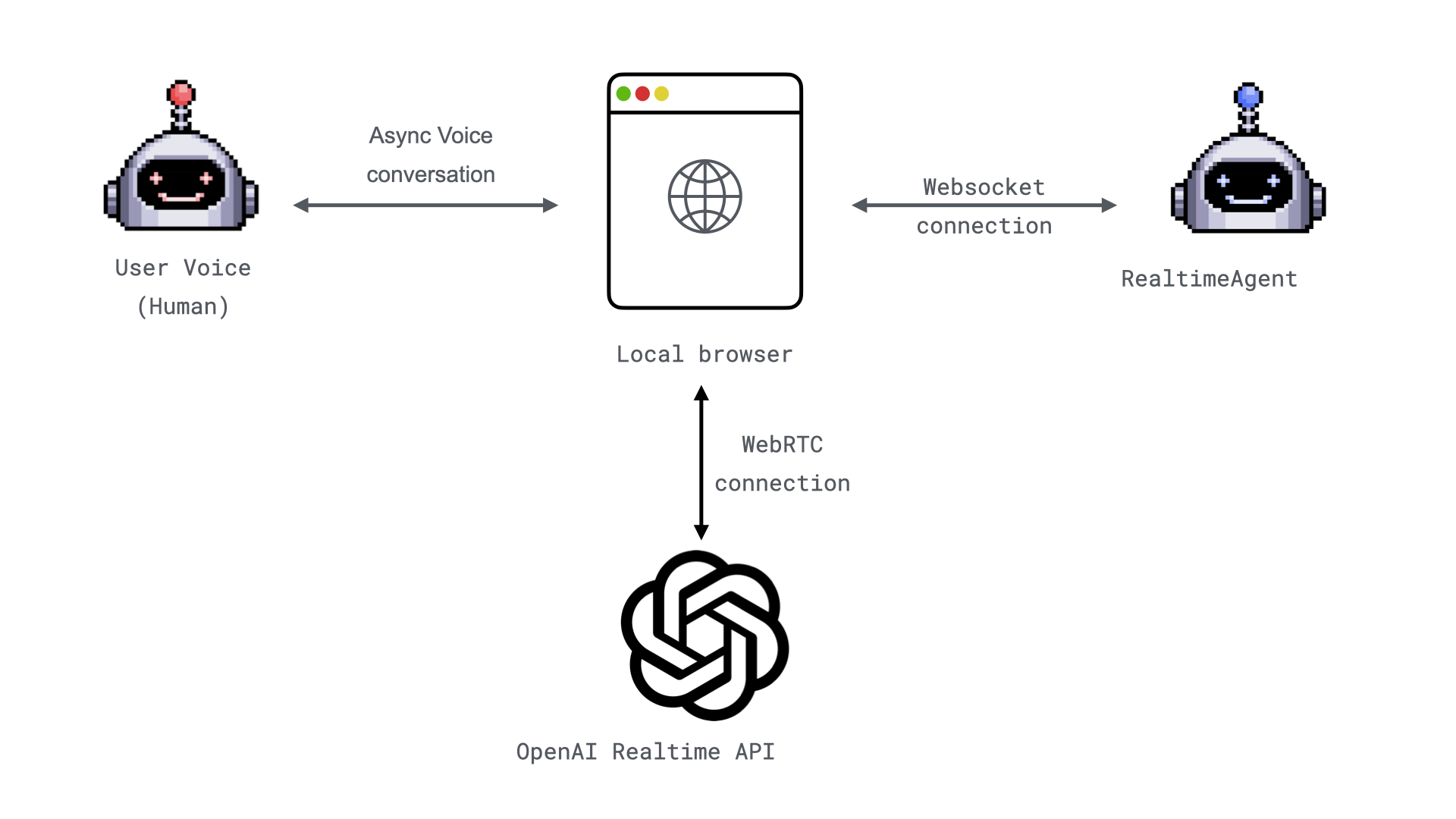
<img src="https://mintcdn.com/ag2ai/LGIgOcmjvGq1jJYv/snippets/advanced-concepts/realtime-agent/img/webrtc_communication_diagram.png?fit=max&auto=format&n=LGIgOcmjvGq1jJYv&q=85&s=fb6de6525ffe7e2a092f6c32a180fafc" alt="Realtime agent communication over WebRTC" width="1920" height="1080" data-path="snippets/advanced-concepts/realtime-agent/img/webrtc_communication_diagram.png" />

**TL;DR:**

* Build a real-time voice application using [WebRTC](https://webrtc.org/) and connect it with the [**`RealtimeAgent`**](/docs/api-reference/autogen/agentchat/realtime/experimental/RealtimeAgent). [Demo implementation](https://github.com/ag2ai/realtime-agent-over-webrtc).
* **Optimized for Real-Time Interactions**: Experience seamless voice communication with minimal latency and enhanced reliability.

# **Realtime Voice Applications with WebRTC**

In our [previous blog post](/docs/blog/2025-01-08-RealtimeAgent-over-websocket), we introduced the [**`WebSocketAudioAdapter`**](/docs/api-reference/autogen/agentchat/realtime/experimental/WebSocketAudioAdapter#websocketaudioadapter), a simple way to stream real-time audio using [WebSockets](https://fastapi.tiangolo.com/advanced/websockets/). While effective, [WebSockets](https://fastapi.tiangolo.com/advanced/websockets/) can face challenges with quality and reliability in high-latency or network-variable scenarios. Enter [WebRTC](https://webrtc.org/).

Today, we’re excited to showcase the integration with [OpenAI Realtime API with WebRTC](https://platform.openai.com/docs/guides/realtime-webrtc), leveraging WebRTC’s peer-to-peer communication capabilities to provide a robust, low-latency, high-quality audio streaming experience directly from the browser.

## **Why WebRTC?**

[WebRTC](https://webrtc.org/) (Web Real-Time Communication) is a powerful technology for enabling direct peer-to-peer communication between browsers and servers. It was built with real-time audio, video, and data transfer in mind, making it an ideal choice for real-time voice applications. Here are some key benefits:

### **1. Low Latency**

[WebRTC's](https://webrtc.org/) peer-to-peer design minimizes latency, ensuring natural, fluid conversations.

### **2. Adaptive Quality**

[WebRTC](https://webrtc.org/) dynamically adjusts audio quality based on network conditions, maintaining a seamless user experience even in suboptimal environments.

### **3. Secure by Design**

With encryption (DTLS and SRTP) baked into its architecture, [WebRTC](https://webrtc.org/) ensures secure communication between peers.

### **4. Widely Supported**

[WebRTC](https://webrtc.org/) is supported by all major modern browsers, making it highly accessible for end users.

## **How It Works**

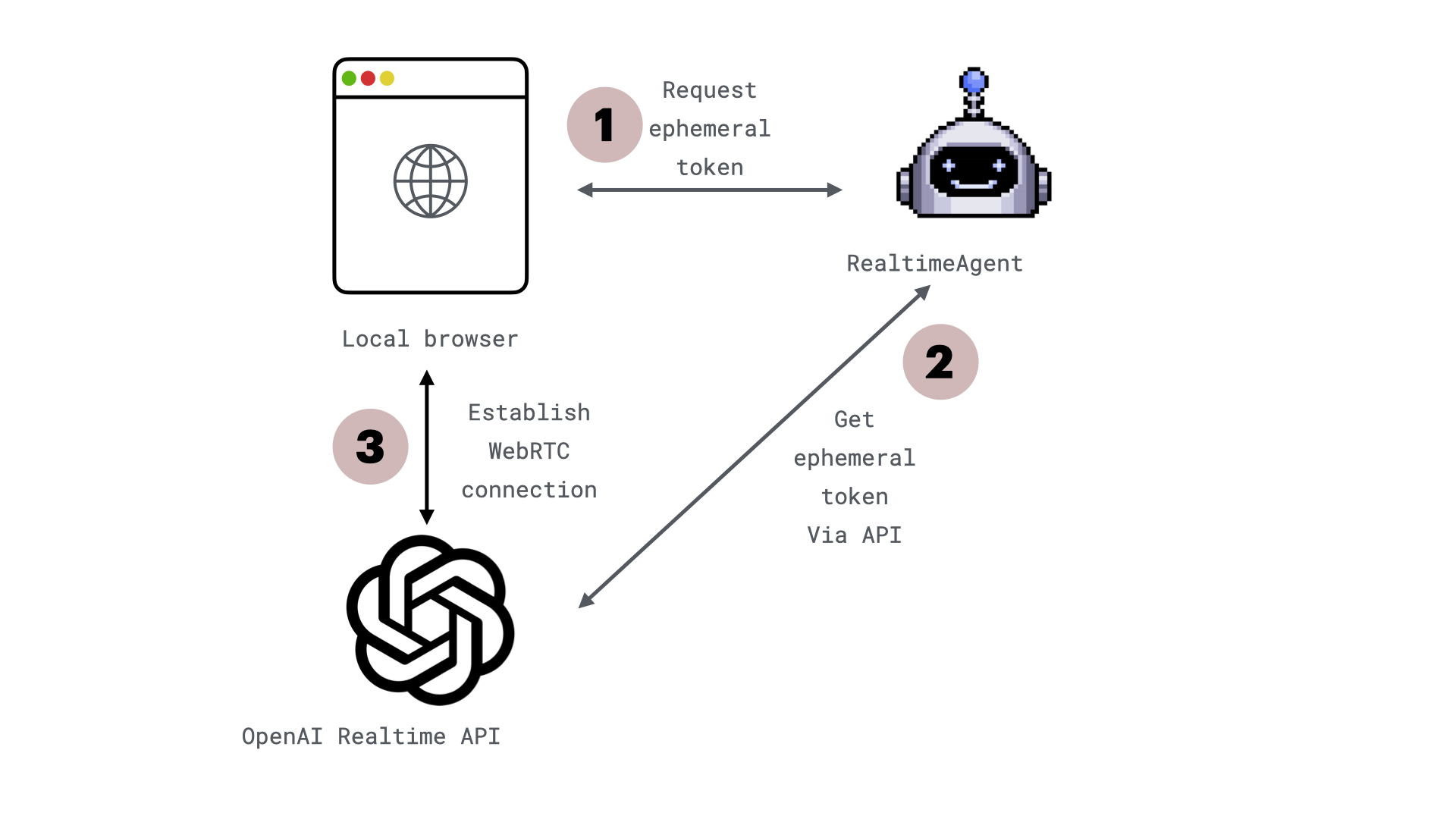
This example demonstrates using [WebRTC](https://webrtc.org/) to establish low-latency, real-time interactions with [OpenAI Realtime API with WebRTC](https://platform.openai.com/docs/guides/realtime-webrtc) from a web browser. Here's how it works:
<img src="https://mintcdn.com/ag2ai/LGIgOcmjvGq1jJYv/snippets/advanced-concepts/realtime-agent/img/webrtc_connection_diagram.png?fit=max&auto=format&n=LGIgOcmjvGq1jJYv&q=85&s=6d84dedef3c247e76b84d21832c7ed14" alt="Realtime agent communication over WebRTC" width="1920" height="1080" data-path="snippets/advanced-concepts/realtime-agent/img/webrtc_connection_diagram.png" />

1. **Request an Ephemeral API Key**

   * The browser connects to your backend via [WebSockets](https://fastapi.tiangolo.com/advanced/websockets/) to exchange configuration details, such as the ephemeral key and model information.
   * [WebSockets](https://fastapi.tiangolo.com/advanced/websockets/) handle signaling to bootstrap the [WebRTC](https://webrtc.org/) session.
   * The browser requests a short-lived API key from your server.

2. **Generate an Ephemeral API Key**

   * Your backend generates an ephemeral key via the OpenAI REST API and returns it. These keys expire after one minute to enhance security.

3. **Initialize the WebRTC Connection**

   * **Audio Streaming**: The browser captures microphone input and streams it to OpenAI while playing audio responses via an `<audio>` element.
   * **DataChannel**: A `DataChannel` is established to send and receive events (e.g., function calls).
   * **Session Handshake**: The browser creates an SDP offer, sends it to OpenAI with the ephemeral key, and sets the remote SDP answer to finalize the connection.
   * The audio stream and events flow in real time, enabling interactive, low-latency conversations.

## **Example: Build a Voice-Enabled Weather Bot**

Let’s walk through a practical example of using [WebRTC](https://webrtc.org/) to create a voice-enabled weather bot.
<Note>You can find the full example [here](https://github.com/ag2ai/realtime-agent-over-webrtc/tree/main).</Note>

### **1. Clone the Repository**

Start by cloning the example project from GitHub:

```bash theme={null}
git clone https://github.com/ag2ai/realtime-agent-over-webrtc.git
cd realtime-agent-over-webrtc
```

### **2. Set Up Environment Variables**

Create a `OAI_CONFIG_LIST` file based on the provided `OAI_CONFIG_LIST_sample`:

```bash theme={null}
cp OAI_CONFIG_LIST_sample OAI_CONFIG_LIST
```

In the `OAI_CONFIG_LIST` file, update the `api_key` with your OpenAI API key.

<Warning>
  Supported key format

  Currently WebRTC can be used only by API keys the begin with:

  ```
  sk-proj
  ```

  Other keys may result internal server error  (500) on OpenAI server. For more details see [this issue](https://community.openai.com/t/realtime-api-create-sessions-results-in-500-internal-server-error/1060964/5)
</Warning>

### (Optional) Create and Use a Virtual Environment

To avoid cluttering your global Python environment:

```bash theme={null}
python3 -m venv env
source env/bin/activate
```

### **3. Install Dependencies**

Install the required Python packages:

```bash theme={null}
pip install -r requirements.txt
```

### **4. Start the Server**

Run the application with Uvicorn:

```bash theme={null}
uvicorn realtime_over_webrtc.main:app --port 5050
```

When the server starts, you should see:

```bash theme={null}
INFO:     Started server process [12345]
INFO:     Uvicorn running on http://0.0.0.0:5050 (Press CTRL+C to quit)
```

### **5. Open the Application**

Navigate to [**localhost:5050/start-chat**](http://localhost:5050/start-chat) in your browser. The application will request microphone permissions to enable real-time voice interaction.

<img src="https://mintcdn.com/ag2ai/LGIgOcmjvGq1jJYv/snippets/advanced-concepts/realtime-agent/img/webrtc_chat.png?fit=max&auto=format&n=LGIgOcmjvGq1jJYv&q=85&s=7852b5014d6fe8b7346be49a8ef37361" alt="Realtime agent chat" width="2708" height="1284" data-path="snippets/advanced-concepts/realtime-agent/img/webrtc_chat.png" />

### **6. Start Speaking**

To get started, simply speak into your microphone and ask a question. For example, you can say:

**"What's the weather like in Rome?"**

This initial question will activate the agent, and it will respond, showcasing its ability to understand and interact with you in real time.

## **Code review**

### WebRTC connection

A part of the [WebRTC](https://webrtc.org/) connection logic runs in browser,
and it is implemented by [AG2 javascript client library](https://www.npmjs.com/package/@ag2/client)

While you would usually use npm package in your project, for simplicity in this example we are
referencing [AG2 javascript client library](https://www.npmjs.com/package/@ag2/client) directly with:

```javascript theme={null}
<script src="https://github.com/ag2ai/ag2-js-client/releases/download/v0.2.0/index.global.js"></script>
```

And code snippet to connect to the AG2 server is as follows:

```javascript theme={null}
    const webRTC = new ag2client.WebRTC(socketUrl)
    await webRTC.connect();
```

### Server implementation

This server implementation uses [FastAPI](https://fastapi.tiangolo.com/) to set up a [WebRTC](https://webrtc.org/) and [WebSockets](https://fastapi.tiangolo.com/advanced/websockets/) interaction, allowing clients to communicate with a chatbot powered by OpenAI's Realtime API. The server provides endpoints for a simple chat interface and real-time audio communication.

#### Create an app using FastAPI

First, initialize a [FastAPI](https://fastapi.tiangolo.com/) app instance to handle HTTP requests and [WebSocket](https://fastapi.tiangolo.com/advanced/websockets/) connections.

```python theme={null}
app = FastAPI()
```

This creates an app instance that will be used to manage both regular HTTP requests and real-time [WebSocket](https://fastapi.tiangolo.com/advanced/websockets/) interactions.

#### Define the root endpoint for status

Next, define a root endpoint to verify that the server is running.

```python theme={null}
@app.get("/", response_class=JSONResponse)
async def index_page():
    return {"message": "WebRTC AG2 Server is running!"}
```

When accessed, this endpoint responds with a simple status message indicating that the [WebRTC](https://webrtc.org/) server is up and running.

#### Set up static files and templates

Mount a directory for static files (e.g., CSS, JavaScript) and configure templates for rendering HTML.

```python theme={null}
website_files_path = Path(__file__).parent / "website_files"

app.mount(
    "/static", StaticFiles(directory=website_files_path / "static"), name="static"
)

templates = Jinja2Templates(directory=website_files_path / "templates")
```

This ensures that static assets (like styling or scripts) can be served and that HTML templates can be rendered for dynamic responses.

#### Serve the chat interface page

Create an endpoint to serve the HTML page for the chat interface.

```python theme={null}
@app.get("/start-chat/", response_class=HTMLResponse)
async def start_chat(request: Request):
    """Endpoint to return the HTML page for audio chat."""
    port = request.url.port
    return templates.TemplateResponse("chat.html", {"request": request, "port": port})
```

This endpoint serves the `chat.html` page and provides the port number in the template, which is used for [WebSockets](https://fastapi.tiangolo.com/advanced/websockets/) connections.

#### Handle WebSocket connections for media streaming

Set up a [WebSocket](https://fastapi.tiangolo.com/advanced/websockets/) endpoint to handle real-time interactions, including receiving audio streams and responding with OpenAI's model output.

```python theme={null}
@app.websocket("/session")
async def handle_media_stream(websocket: WebSocket):
    """Handle WebSocket connections providing audio stream and OpenAI."""
    await websocket.accept()

    logger = getLogger("uvicorn.error")

    realtime_agent = RealtimeAgent(
        name="Weather Bot",
        system_message="Hello there! I am an AI voice assistant powered by Autogen and the OpenAI Realtime API. You can ask me about weather, jokes, or anything you can imagine. Start by saying 'How can I help you'?",
        llm_config=realtime_llm_config,
        websocket=websocket,
        logger=logger,
    )
```

This [WebSocket](https://fastapi.tiangolo.com/advanced/websockets/) endpoint establishes a connection and creates a [**`RealtimeAgent`**](/docs/api-reference/autogen/agentchat/realtime/experimental/RealtimeAgent) that will manage interactions with OpenAI’s Realtime API. It also includes logging for monitoring the process.

#### Register and implement real-time functions

Define custom real-time functions that can be called from the client side, such as fetching weather data.

```python theme={null}
    @realtime_agent.register_realtime_function(
        name="get_weather", description="Get the current weather"
    )
    def get_weather(location: Annotated[str, "city"]) -> str:
        logger.info(f"Checking the weather: {location}")
        return (
            "The weather is cloudy." if location == "Rome" else "The weather is sunny."
        )
```

Here, a weather-related function is registered with the [**`RealtimeAgent`**](/docs/api-reference/autogen/agentchat/realtime/experimental/RealtimeAgent). It responds with a simple weather message based on the input city.

#### Run the RealtimeAgent

Finally, run the [**`RealtimeAgent`**](/docs/api-reference/autogen/agentchat/realtime/experimental/RealtimeAgent) to start handling the [WebSocket](https://fastapi.tiangolo.com/advanced/websockets/) interactions.

```python theme={null}
    await realtime_agent.run()
```

This starts the agent's event loop, which listens for incoming messages and responds accordingly.

## **Conclusion**

New integration of [OpenAI Realtime API with WebRTC](https://platform.openai.com/docs/guides/realtime-webrtc) unlocks the full potential of [WebRTC](https://webrtc.org/) for real-time voice applications. With its low latency, adaptive quality, and secure communication, it’s the perfect tool for building interactive, voice-enabled applications.

Try it today and take your voice applications to the next level!

<div className="edit-url-container">
  <a className="edit-url" href="https://github.com/ag2ai/ag2/edit/main/website/docs/_blogs/2025-01-09-RealtimeAgent-over-WebRTC/index.mdx" target="_blank"><Icon icon="pen" iconType="solid" size="13px" /> Edit this page</a>
</div>