> ## Documentation Index
> Fetch the complete documentation index at: https://docs.ag2.ai/llms.txt
> Use this file to discover all available pages before exploring further.
# Chat workflow
API Reference: [initiate\_chat](/docs/api-reference/autogen/ConversableAgent#initiate-chat)
`initiate_chat` is the typical method of starting a conversation in AG2. You can call this directly, as shown in the code below, and it is also the mechanism that sits within ConversableAgent's [run](/docs/api-reference/autogen/ConversableAgent#run) method.
```python theme={null}
from autogen import ConversableAgent, LLMConfig
llm_config = LLMConfig(model="gpt-4o-mini", api_type="openai", cache_seed=None)
with llm_config:
agent_a = ConversableAgent(name="agent_a")
agent_b = ConversableAgent(name="agent_b")
agent_a.initiate_chat(
recipient=agent_b,
message="Tell me a joke",
max_turns=2
)
```
Let's have a look at the flow of [ConversableAgent.initiate\_chat](/docs/api-reference/autogen/ConversableAgent#initiate-chat) and then break it down.
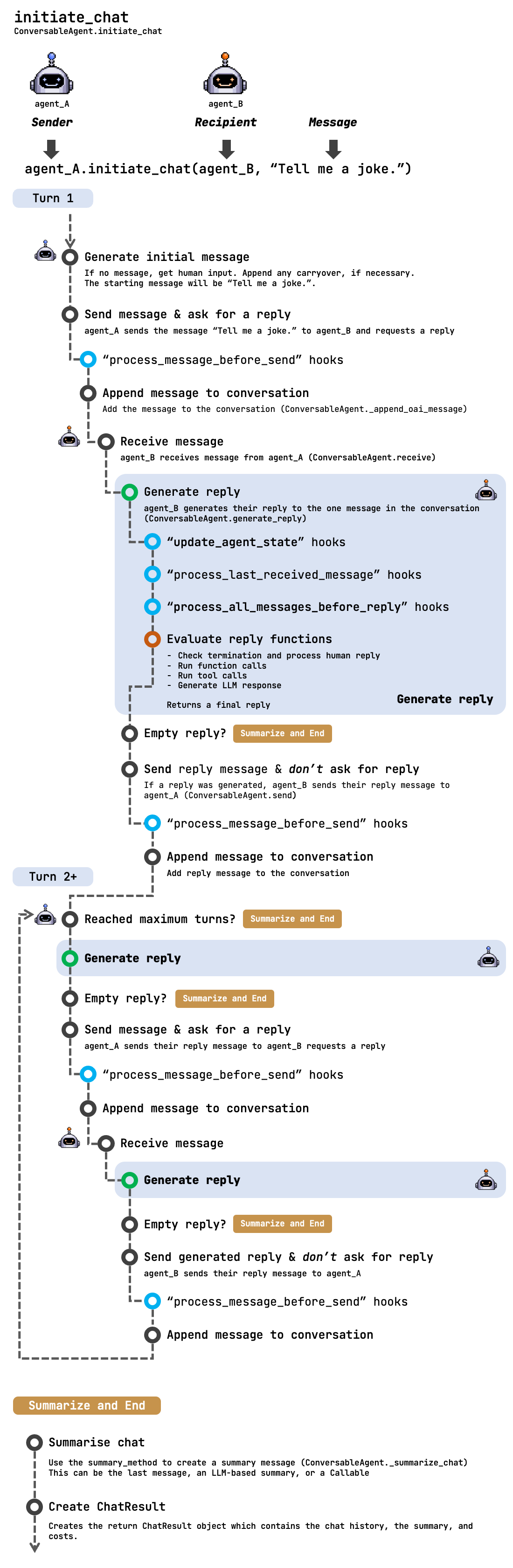 Breakdown of the **first turn**:
1. Generate the initial message based on what is passed in. If nothing is passed in, we'll prompt the user for input. Options for carryover also exist, though not commonly used when starting a new conversation.
2. `agent_A` sends the message ("Tell me a joke") to our recipient, `agent_B`, and requests a reply.
3. We evaluate any "process\_message\_before\_send" hooks, see [Hooks](/docs/contributor-guide/how-ag2-works/hooks), allowing functions to update the message before it gets sent to the recipient.
4. Append the message to our messages list.
5. Now we're on `agent-B` receiving the message (API Reference: [receive](/docs/api-reference/autogen/ConversableAgent#receive)).
6. The agent generates a reply given the message(s) received. This is a critical step in the process, see [Generating a reply](/docs/contributor-guide/how-ag2-works/generate-reply) for an in-depth look at this step.
* Evaluate our "update\_agent\_state", "process\_last\_received\_message", and "process\_all\_messages\_before\_reply" hooks (see [Hooks](/docs/contributor-guide/how-ag2-works/hooks)). These allow agent and message state to be updated before the following reply functions are evaluated.
* Evaluate the agent's reply functions, this is where the actual reply from an agent is generated.
* Check termination and human reply
* Run function and tool calls
* Execute code blocks
* Generate LLM response
7. If no reply is generated, we finish this turn
8. If a reply is generated, it is sent back to `agent_A`, any "process\_message\_before\_send" hooks are evaluated, and the message is appended to our messages list.
Breakdown of **turns 2 onward**:
1. Start by checking if we have reached our maximum turns, if so, summarize and end the chat.
2. The sending agent, `agent_A` generates their reply to the messages (see [Generating a reply](/docs/contributor-guide/how-ag2-works/generate-reply)).
3. If they don't generate a reply, summarize and end the chat.
4. Otherwise, send their reply to `agent_B` and request a reply.
5. `agent_B` generates a reply and, if they generate one, it gets added to the messages list. The loop then continues until the maximum turns are reached or we reach a point where we need to summarize and end.
**Summarize and End**:
With the chat now ended, we summarize the chat using the ConversableAgent.\_summarize\_chat method.
Controlled using `initiate_chat`'s `summary_method` argument, this is typically either:
* The last message (`summary_method` = "last\_msg")
* An LLM generated summary of the messages using the *senders* LLM configuration (`summary_method` = "reflection\_with\_llm")
Finally, a [ChatResult](/docs/api-reference/autogen/ChatResult) object is returned. This object contains:
* The chat history (the messages list)
* The summary generated above
* The cost of the conversation (based on the input and output tokens and the LLM)
### GroupChat
[initiate\_chat](/docs/api-reference/autogen/ConversableAgent#initiate-chat) can be used to start a group chat by having the GroupChat's GroupChatManager agent as the recipient parameter.
Breakdown of the **first turn**:
1. Generate the initial message based on what is passed in. If nothing is passed in, we'll prompt the user for input. Options for carryover also exist, though not commonly used when starting a new conversation.
2. `agent_A` sends the message ("Tell me a joke") to our recipient, `agent_B`, and requests a reply.
3. We evaluate any "process\_message\_before\_send" hooks, see [Hooks](/docs/contributor-guide/how-ag2-works/hooks), allowing functions to update the message before it gets sent to the recipient.
4. Append the message to our messages list.
5. Now we're on `agent-B` receiving the message (API Reference: [receive](/docs/api-reference/autogen/ConversableAgent#receive)).
6. The agent generates a reply given the message(s) received. This is a critical step in the process, see [Generating a reply](/docs/contributor-guide/how-ag2-works/generate-reply) for an in-depth look at this step.
* Evaluate our "update\_agent\_state", "process\_last\_received\_message", and "process\_all\_messages\_before\_reply" hooks (see [Hooks](/docs/contributor-guide/how-ag2-works/hooks)). These allow agent and message state to be updated before the following reply functions are evaluated.
* Evaluate the agent's reply functions, this is where the actual reply from an agent is generated.
* Check termination and human reply
* Run function and tool calls
* Execute code blocks
* Generate LLM response
7. If no reply is generated, we finish this turn
8. If a reply is generated, it is sent back to `agent_A`, any "process\_message\_before\_send" hooks are evaluated, and the message is appended to our messages list.
Breakdown of **turns 2 onward**:
1. Start by checking if we have reached our maximum turns, if so, summarize and end the chat.
2. The sending agent, `agent_A` generates their reply to the messages (see [Generating a reply](/docs/contributor-guide/how-ag2-works/generate-reply)).
3. If they don't generate a reply, summarize and end the chat.
4. Otherwise, send their reply to `agent_B` and request a reply.
5. `agent_B` generates a reply and, if they generate one, it gets added to the messages list. The loop then continues until the maximum turns are reached or we reach a point where we need to summarize and end.
**Summarize and End**:
With the chat now ended, we summarize the chat using the ConversableAgent.\_summarize\_chat method.
Controlled using `initiate_chat`'s `summary_method` argument, this is typically either:
* The last message (`summary_method` = "last\_msg")
* An LLM generated summary of the messages using the *senders* LLM configuration (`summary_method` = "reflection\_with\_llm")
Finally, a [ChatResult](/docs/api-reference/autogen/ChatResult) object is returned. This object contains:
* The chat history (the messages list)
* The summary generated above
* The cost of the conversation (based on the input and output tokens and the LLM)
### GroupChat
[initiate\_chat](/docs/api-reference/autogen/ConversableAgent#initiate-chat) can be used to start a group chat by having the GroupChat's GroupChatManager agent as the recipient parameter.