> ## Documentation Index
> Fetch the complete documentation index at: https://docs.ag2.ai/llms.txt
> Use this file to discover all available pages before exploring further.
# Portkey Integration
 [Portkey](https://portkey.ai) is a 2-line upgrade to make your AG2 agents reliable, cost-efficient, and fast.
Portkey adds 4 core production capabilities to any AG2 agent:
1. Routing to 200+ LLMs
2. Making each LLM call more robust
3. Full-stack tracing & cost, performance analytics
4. Real-time guardrails to enforce behavior
## Getting Started
1. **Install Required Packages:**
2. ```bash theme={null}
pip install -qU ag2 portkey-ai
```
**Configure AG2 with Portkey:**
```python theme={null}
from autogen import AssistantAgent, UserProxyAgent, LLMConfig
from portkey_ai import PORTKEY_GATEWAY_URL, createHeaders
llm_config = LLMConfig(
api_key="OPENAI_API_KEY",
model="gpt-3.5-turbo",
base_url=PORTKEY_GATEWAY_URL,
api_type="openai",
default_headers=createHeaders(
api_key="YOUR_PORTKEY_API_KEY",
provider="openai",
)
)
```
Generate your API key in the [Portkey Dashboard](https://app.portkey.ai/).
And, that's it! With just this, you can start logging all of your AutoGen requests and make them reliable.
3. **Let's Run your Agent**
```python theme={null}
import autogen
# Create user proxy agent, coder, product manager
user_proxy = autogen.UserProxyAgent(
name="User_proxy",
system_message="A human admin who will give the idea and run the code provided by Coder.",
code_execution_config={"last_n_messages": 2, "work_dir": "groupchat"},
human_input_mode="ALWAYS",
)
with llm_config:
coder = autogen.AssistantAgent(
name="Coder",
system_message = "You are a Python developer who is good at developing games. You work with Product Manager.",
)
# Create groupchat
groupchat = autogen.GroupChat(
agents=[user_proxy, coder], messages=[])
manager = autogen.GroupChatManager(groupchat=groupchat, llm_config=llm_config)
# Start the conversation
user_proxy.initiate_chat(
manager, message="Build a classic & basic pong game with 2 players in python")
```
[Portkey](https://portkey.ai) is a 2-line upgrade to make your AG2 agents reliable, cost-efficient, and fast.
Portkey adds 4 core production capabilities to any AG2 agent:
1. Routing to 200+ LLMs
2. Making each LLM call more robust
3. Full-stack tracing & cost, performance analytics
4. Real-time guardrails to enforce behavior
## Getting Started
1. **Install Required Packages:**
2. ```bash theme={null}
pip install -qU ag2 portkey-ai
```
**Configure AG2 with Portkey:**
```python theme={null}
from autogen import AssistantAgent, UserProxyAgent, LLMConfig
from portkey_ai import PORTKEY_GATEWAY_URL, createHeaders
llm_config = LLMConfig(
api_key="OPENAI_API_KEY",
model="gpt-3.5-turbo",
base_url=PORTKEY_GATEWAY_URL,
api_type="openai",
default_headers=createHeaders(
api_key="YOUR_PORTKEY_API_KEY",
provider="openai",
)
)
```
Generate your API key in the [Portkey Dashboard](https://app.portkey.ai/).
And, that's it! With just this, you can start logging all of your AutoGen requests and make them reliable.
3. **Let's Run your Agent**
```python theme={null}
import autogen
# Create user proxy agent, coder, product manager
user_proxy = autogen.UserProxyAgent(
name="User_proxy",
system_message="A human admin who will give the idea and run the code provided by Coder.",
code_execution_config={"last_n_messages": 2, "work_dir": "groupchat"},
human_input_mode="ALWAYS",
)
with llm_config:
coder = autogen.AssistantAgent(
name="Coder",
system_message = "You are a Python developer who is good at developing games. You work with Product Manager.",
)
# Create groupchat
groupchat = autogen.GroupChat(
agents=[user_proxy, coder], messages=[])
manager = autogen.GroupChatManager(groupchat=groupchat, llm_config=llm_config)
# Start the conversation
user_proxy.initiate_chat(
manager, message="Build a classic & basic pong game with 2 players in python")
```
Here’s the output from your Agent’s run on Portkey's dashboard
 ## Key Features
Portkey offers a range of advanced features to enhance your AG2 agents. Here’s an overview
| Feature | Description |
| -------------------------------------------------------- | ------------------------------------------------------------------ |
| 🌐 [Multi-LLM Integration](#interoperability) | Access 200+ LLMs with simple configuration changes |
| 🛡️ [Enhanced Reliability](#reliability) | Implement fallbacks, load balancing, retries, and much more |
| 📊 [Advanced Metrics](#metrics) | Track costs, tokens, latency, and 40+ custom metrics effortlessly |
| 🔍 [Detailed Traces and Logs](#comprehensive-logging) | Gain insights into every agent action and decision |
| 🚧 [Guardrails](#guardrails) | Enforce agent behavior with real-time checks on inputs and outputs |
| 🔄 [Continuous Optimization](#continuous-improvement) | Capture user feedback for ongoing agent improvements |
| 💾 [Smart Caching](#caching) | Reduce costs and latency with built-in caching mechanisms |
| 🔐 [Enterprise-Grade Security](#security-and-compliance) | Set budget limits and implement fine-grained access controls |
## Colab Notebook
For a hands-on example of integrating Portkey with AG2, check out our notebook
## Key Features
Portkey offers a range of advanced features to enhance your AG2 agents. Here’s an overview
| Feature | Description |
| -------------------------------------------------------- | ------------------------------------------------------------------ |
| 🌐 [Multi-LLM Integration](#interoperability) | Access 200+ LLMs with simple configuration changes |
| 🛡️ [Enhanced Reliability](#reliability) | Implement fallbacks, load balancing, retries, and much more |
| 📊 [Advanced Metrics](#metrics) | Track costs, tokens, latency, and 40+ custom metrics effortlessly |
| 🔍 [Detailed Traces and Logs](#comprehensive-logging) | Gain insights into every agent action and decision |
| 🚧 [Guardrails](#guardrails) | Enforce agent behavior with real-time checks on inputs and outputs |
| 🔄 [Continuous Optimization](#continuous-improvement) | Capture user feedback for ongoing agent improvements |
| 💾 [Smart Caching](#caching) | Reduce costs and latency with built-in caching mechanisms |
| 🔐 [Enterprise-Grade Security](#security-and-compliance) | Set budget limits and implement fine-grained access controls |
## Colab Notebook
For a hands-on example of integrating Portkey with AG2, check out our notebook
[](https://git.new/Portkey-Autogen) .
## Advanced Features
### Interoperability
Easily switch between **200+ LLMs** by changing the `provider` and API key in your configuration.
#### Example: Switching from OpenAI to Azure OpenAI
```python theme={null}
config = [
{
"api_key": "api-key",
"model": "gpt-3.5-turbo",
"base_url": PORTKEY_GATEWAY_URL,
"api_type": "openai",
"default_headers": createHeaders(
api_key="YOUR_PORTKEY_API_KEY",
provider="azure-openai",
virtual_key="AZURE_VIRTUAL_KEY"
)
}
]
```
Note: AG2 messages will go through Portkey's AI Gateway following OpenAI's API signature. Some language models may not work properly because messages need to be in a specific role order.
### Reliability
Implement fallbacks, load balancing, and automatic retries to make your agents more resilient.
```python theme={null}
{
"strategy": {
"mode": "fallback" # Options: "loadbalance" or "fallback"
},
"targets": [
{
"provider": "openai",
"api_key": "openai-api-key",
"override_params": {
"top_k": "0.4",
"max_tokens": "100"
}
},
{
"provider": "anthropic",
"api_key": "anthropic-api-key",
"override_params": {
"top_p": "0.6",
"model": "claude-3-5-sonnet-20240620"
}
}
]
}
```
Learn more about [Portkey Config object here](https://docs.portkey.ai/docs/product/ai-gateway-streamline-llm-integrations/configs).
Be Careful to Load-Balance/Fallback to providers that don't support tool calling when the request contains a function call.
### Metrics
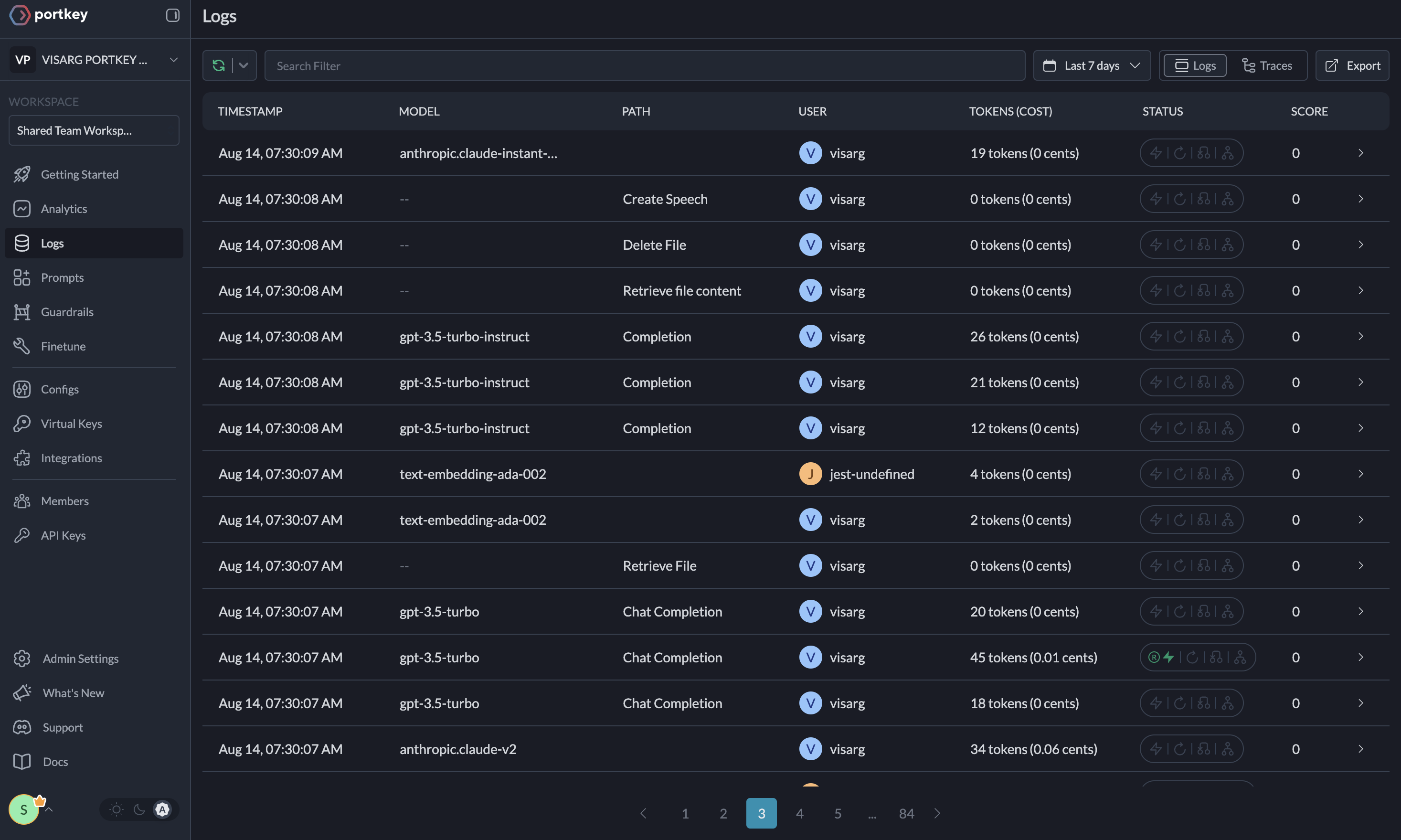
Agent runs are complex. Portkey automatically logs **40+ comprehensive metrics** for your AI agents, including cost, tokens used, latency, etc. Whether you need a broad overview or granular insights into your agent runs, Portkey's customizable filters provide the metrics you need.
[](https://app.portkey.ai/)
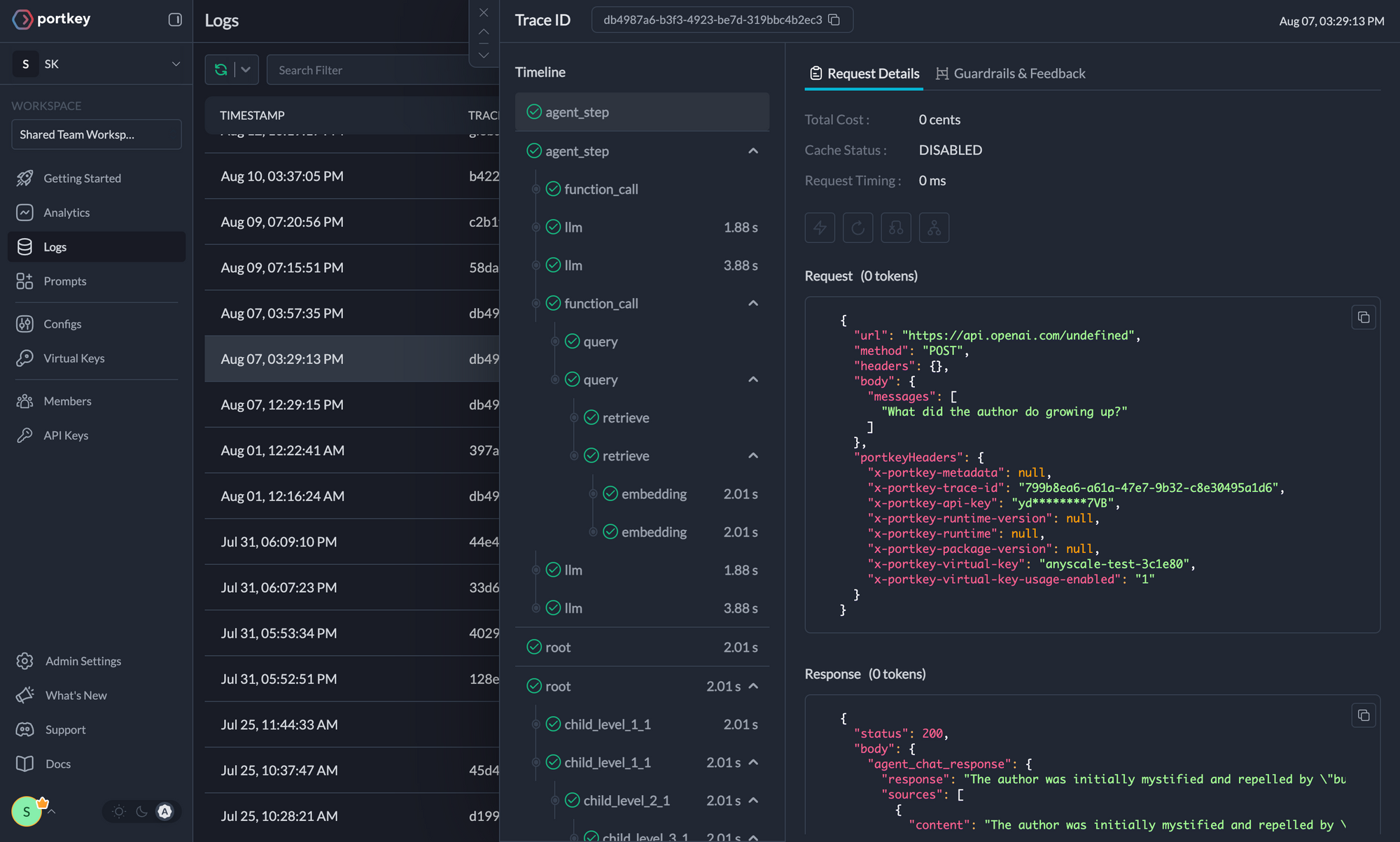
### Comprehensive Logging
Access detailed logs and traces of agent activities, function calls, and errors. Filter logs based on multiple parameters for in-depth analysis.
[](https://app.portkey.ai/)
### Guardrails
AG2 agents, while powerful, can sometimes produce unexpected or undesired outputs. Portkey's Guardrails feature helps enforce agent behavior in real-time, ensuring your AG2 agents operate within specified parameters. Verify both the **inputs** to and *outputs* from your agents to ensure they adhere to specified formats and content guidelines. Learn more about Portkey's Guardrails [here](https://portkey.ai/docs/product/guardrails)
### Continuous Improvement
Capture qualitative and quantitative user feedback on your requests to continuously enhance your agent performance.
### Caching
Reduce costs and latency with Portkey's built-in caching system.
```python theme={null}
portkey_config = {
"cache": {
"mode": "semantic" # Options: "simple" or "semantic"
}
}
```
### Security and Compliance
Set budget limits on provider API keys and implement fine-grained user roles and permissions for both your application and the Portkey APIs.
## Additional Resources
* [📘 Portkey Documentation](https://docs.portkey.ai)
* [🐦 Twitter](https://twitter.com/portkeyai)
* [💬 Discord Community](https://discord.gg/JHPt4C7r)
* [📊 Portkey App](https://app.portkey.ai)
For more information on using these features and setting up your Config, please refer to the [Portkey documentation](https://docs.portkey.ai).