> ## Documentation Index
> Fetch the complete documentation index at: https://docs.ag2.ai/llms.txt
> Use this file to discover all available pages before exploring further.
# Two-Agent Chat
## Two-Agent Chat and Chat Result
Two-agent chat is the simplest form of conversation pattern.
We start a two-agent chat using the `initiate_chat` method of every `ConversableAgent` agent.
The following figure illustrates how two-agent chat works.
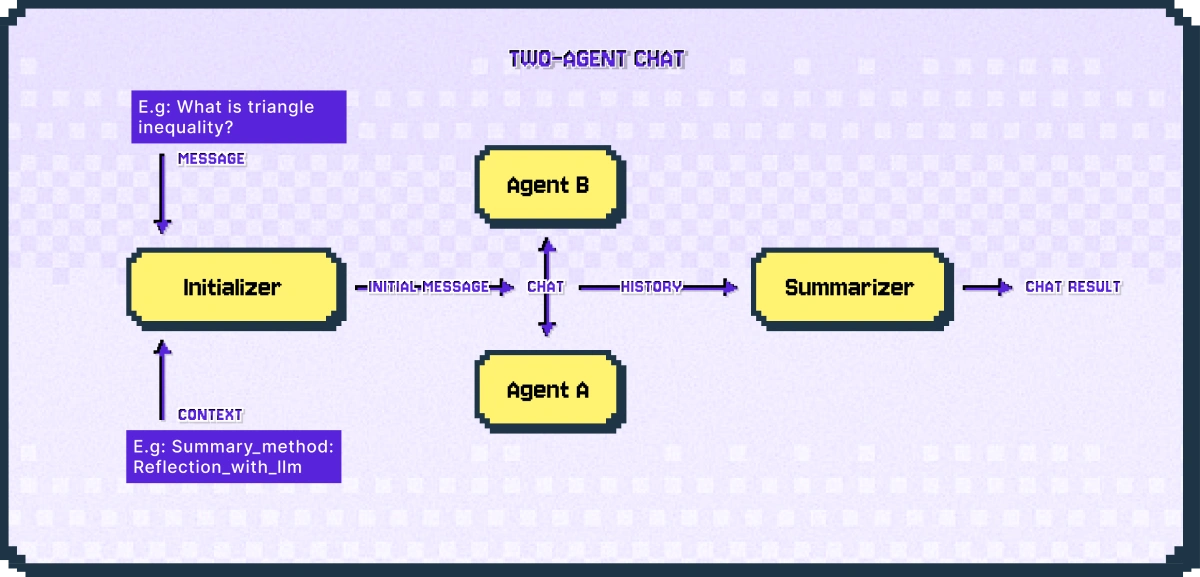 A two-agent chats takes two inputs: a message, which is a string provided by the caller; a context, which specifies various parameters of the chat.
The sender agent uses its chat initializer method (i.e., `generate_init_message` method of `ConversableAgent`) to generate an initial message from the inputs, and sends it to the recipient agent to start the chat.
The sender agent is the agent whose `initiate_chat` method is called, and the recipient agent is the other agent.
Once the chat terminates, the history of the chat is processed by a chat summarizer. The summarizer summarizes the chat history and calculates the token usage of the chat. You can configure the type of summary using the `summary_method` parameter of the `initiate_chat` method. By default, it is the last message of the chat (i.e., `summary_method='last_msg'`).
The example below is a two-agent chat between a student agent and a teacher agent. Its summarizer uses an LLM-based summary.
```python theme={null}
import os
from autogen import ConversableAgent, LLMConfig
llm_config=LLMConfig(api_type="openai", model="gpt-4o-mini", api_key=os.environ["OPENAI_API_KEY"])
with llm_config:
student_agent = ConversableAgent(
name="Student_Agent",
system_message="You are a student willing to learn.",
)
teacher_agent = ConversableAgent(
name="Teacher_Agent",
system_message="You are a math teacher.",
)
chat_result = student_agent.initiate_chat(
teacher_agent,
message="What is triangle inequality?",
summary_method="reflection_with_llm",
max_turns=2,
)
print(chat_result.summary)
```
In the above example, the summary method is set to `reflection_with_llm` which takes a list of messages from the conversation and summarize them using a call to an LLM.
The summary method first tries to use the recipient's LLM, if it is not available then it uses the sender's LLM. In this case the recipient is "Teacher\_Agent" and the sender is "Student\_Agent".
The input prompt for the LLM is the following default prompt:
```python theme={null}
print(ConversableAgent.DEFAULT_SUMMARY_PROMPT)
```
You can also use a custom prompt by setting the `summary_prompt` argument of `initiate_chat`.
There are some other useful information in the `ChatResult` object, including the conversation history, human input, and token cost.
```python theme={null}
# Get the chat history.
import pprint
pprint.pprint(chat_result.chat_history)
```
A two-agent chats takes two inputs: a message, which is a string provided by the caller; a context, which specifies various parameters of the chat.
The sender agent uses its chat initializer method (i.e., `generate_init_message` method of `ConversableAgent`) to generate an initial message from the inputs, and sends it to the recipient agent to start the chat.
The sender agent is the agent whose `initiate_chat` method is called, and the recipient agent is the other agent.
Once the chat terminates, the history of the chat is processed by a chat summarizer. The summarizer summarizes the chat history and calculates the token usage of the chat. You can configure the type of summary using the `summary_method` parameter of the `initiate_chat` method. By default, it is the last message of the chat (i.e., `summary_method='last_msg'`).
The example below is a two-agent chat between a student agent and a teacher agent. Its summarizer uses an LLM-based summary.
```python theme={null}
import os
from autogen import ConversableAgent, LLMConfig
llm_config=LLMConfig(api_type="openai", model="gpt-4o-mini", api_key=os.environ["OPENAI_API_KEY"])
with llm_config:
student_agent = ConversableAgent(
name="Student_Agent",
system_message="You are a student willing to learn.",
)
teacher_agent = ConversableAgent(
name="Teacher_Agent",
system_message="You are a math teacher.",
)
chat_result = student_agent.initiate_chat(
teacher_agent,
message="What is triangle inequality?",
summary_method="reflection_with_llm",
max_turns=2,
)
print(chat_result.summary)
```
In the above example, the summary method is set to `reflection_with_llm` which takes a list of messages from the conversation and summarize them using a call to an LLM.
The summary method first tries to use the recipient's LLM, if it is not available then it uses the sender's LLM. In this case the recipient is "Teacher\_Agent" and the sender is "Student\_Agent".
The input prompt for the LLM is the following default prompt:
```python theme={null}
print(ConversableAgent.DEFAULT_SUMMARY_PROMPT)
```
You can also use a custom prompt by setting the `summary_prompt` argument of `initiate_chat`.
There are some other useful information in the `ChatResult` object, including the conversation history, human input, and token cost.
```python theme={null}
# Get the chat history.
import pprint
pprint.pprint(chat_result.chat_history)
```