AG2’s swarm orchestration provides a flexible and powerful method of
managing a conversation with multiple agents, tools, and transitions.
In this notebook, we look at more advanced features of the swarm
orchestration.
If you are new to swarm, check out this
notebook,
where we introduce the core features of swarms including global context
variables, hand offs, and initiating a swarm chat.
In this notebook we’re going to demonstrate these features AG2’s swarm
orchestration:
AG2’s swarm orchestration provides a flexible and powerful method of
managing a conversation with multiple agents, tools, and transitions.
In this notebook, we look at more advanced features of the swarm
orchestration.
If you are new to swarm, check out this
notebook,
where we introduce the core features of swarms including global context
variables, hand offs, and initiating a swarm chat.
In this notebook we’re going to demonstrate these features AG2’s swarm
orchestration:
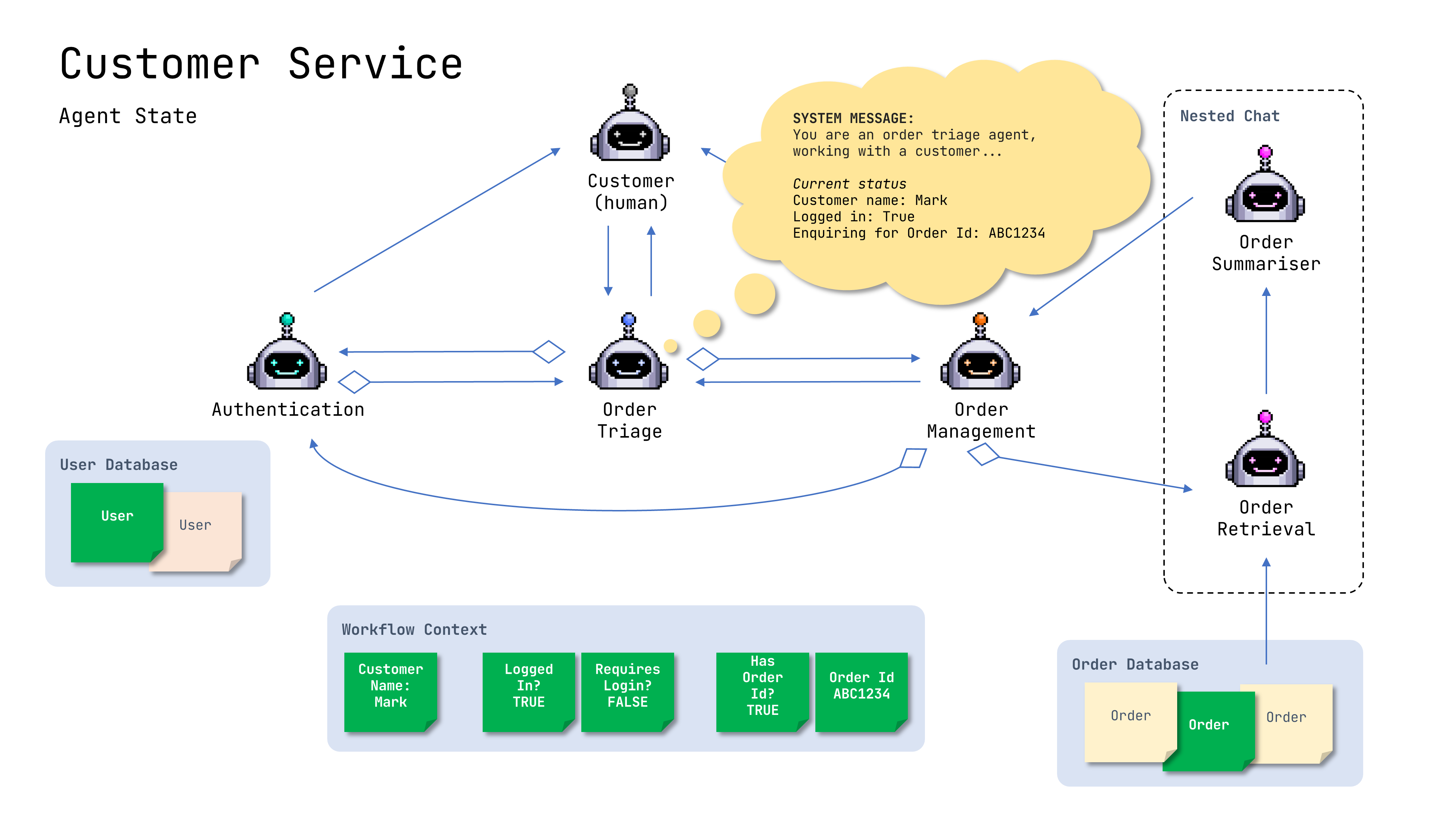
- Updating an agent’s state
- Conditional handoffs
- Nested chats
Install
ag2:pip install -U ag2[openai]
Note: If you have been usingFor more information, please refer to the installation guide.autogenorag2, all you need to do is upgrade it using:orpip install -U autogenaspip install -U ag2autogen, andag2are aliases for the same PyPI package.
Demonstration
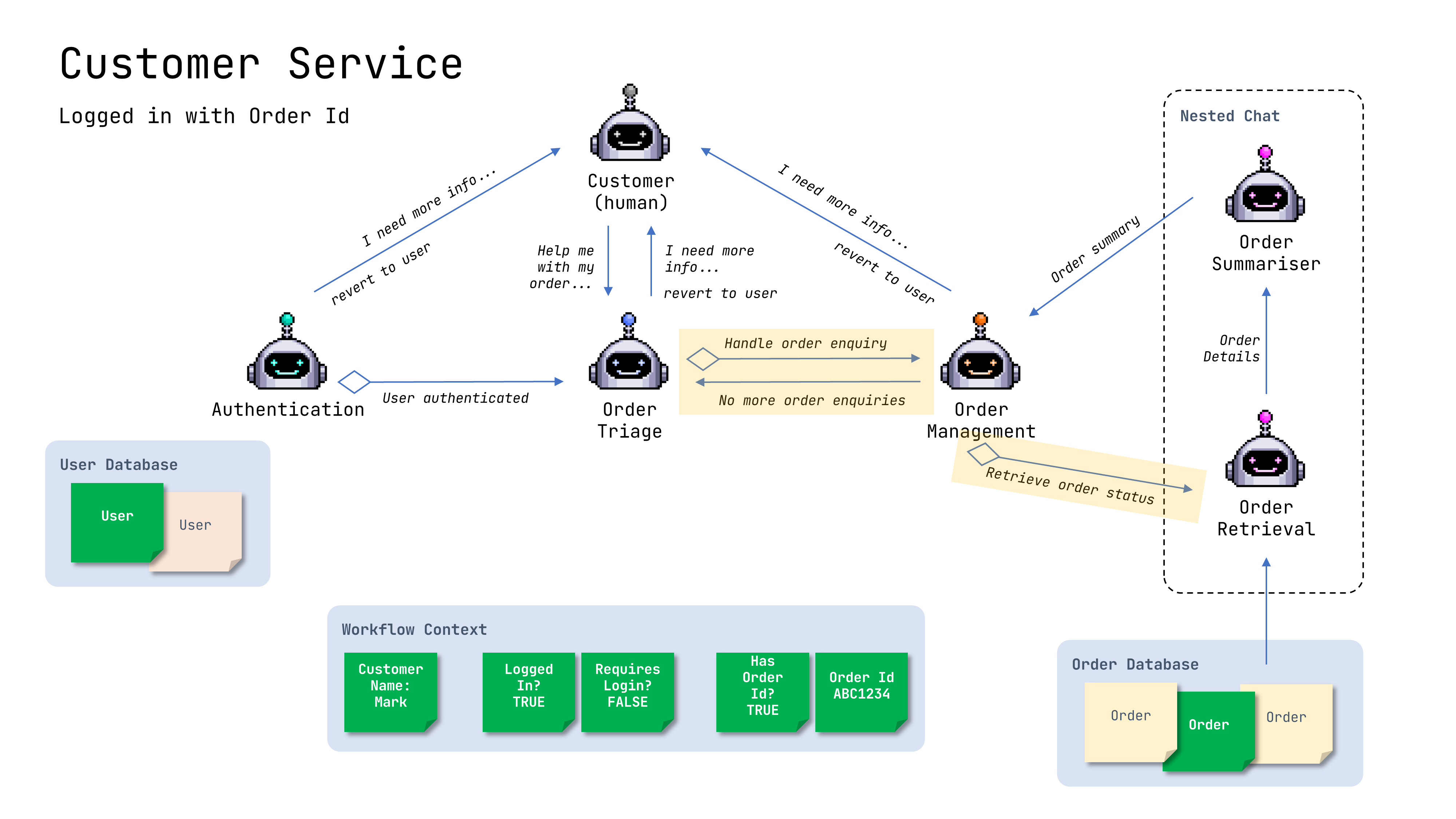
We’re creating this customer service workflow for an e-commerce platform. Customers can ask about the status of their orders, but they must be authenticated to do so.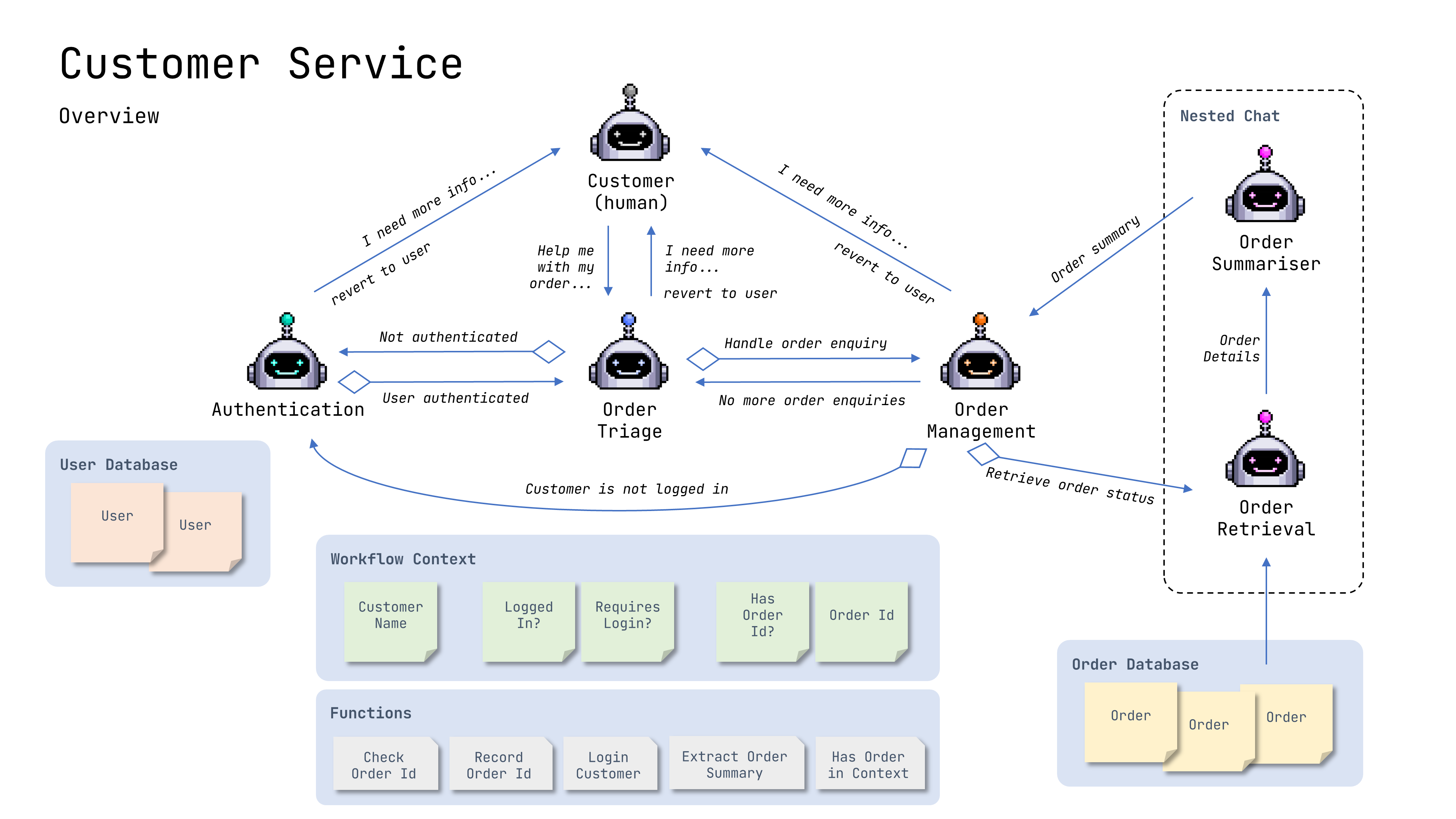 Key aspects of this swarm are:
- System messages are customised, incorporating the context of the workflow
- Handoffs are conditional, only being available when they are relevant
- A nested chat handles the order retrieval and summarisation
# IMPORTS
import json
from typing import Any

# AG2 imports
from autogen import (
    AfterWork,
    AfterWorkOption,
    ContextExpression,
    ConversableAgent,
    LLMConfig,
    OnCondition,
    OnContextCondition,
    SwarmResult,
    UpdateSystemMessage,
    UserProxyAgent,
    initiate_swarm_chat,
    register_hand_off,
)
Set your API Endpoint
TheLLMConfig.from_json
method loads a list of configurations from an environment variable or a
json file.
# Load configuration from an OAI_CONFIG_LIST file
# and filter it to OpenAI's GPT-4o
# Create an LLM configuration with our config
llm_config = LLMConfig.from_json(
    path="OAI_CONFIG_LIST",
    cache_seed=42,
    temperature=1,
    timeout=120,  # change the cache_seed for different trials
).where(tags=["gpt-4o"])
Context
# Context used for controlling the workflow and injecting information
# into some agent's system messages
workflow_context = {
    # customer details
    "customer_name": None,  # Injected into Triage & Order Management Agent's system messages
    "logged_in_username": None,  # Helps validate order
    # workflow status
    "logged_in": False,  # Control the flow
    # order enquiry details
    "has_order_id": False,  # Control the flow
    "order_id": None,  # Order validation and included in system messages
}
Databases
# Mock Databases

# User Database with the username as the key
USER_DATABASE = {
    "mark": {
        "full_name": "Mark Sze",
    },
    "kevin": {
        "full_name": "Yiran Wu",
    },
}

# Order Database with the order number as the key
# The user field aligns with the username in USER_DATABASE
ORDER_DATABASE = {
    "TR13845": {
        "user": "mark",
        "order_number": "TR13845",
        # order status: order_received, shipped, delivered, return_started, returned
        "status": "shipped",
        # return status: N/A, return_started, return_shipped, return_delivered, refund_issued
        "return_status": "N/A",
        "product": "matress",
        "link": "https://www.example.com/TR13845",
        "shipping_address": "123 Main St, State College, PA 12345",
    },
    "TR14234": {
        "user": "kevin",
        "order_number": "TR14234",
        "status": "delivered",
        "return_status": "N/A",
        "product": "pillow",
        "link": "https://www.example.com/TR14234",
        "shipping_address": "123 Main St, State College, PA 12345",
    },
    "TR29384": {
        "user": "mark",
        "order_number": "TR29384",
        "status": "delivered",
        "return_status": "N/A",
        "product": "bed frame",
        "link": "https://www.example.com/TR29384",
        "shipping_address": "123 Main St, State College, PA 12345",
    },
}
Agent’s Functions
# ORDER FUNCTIONS
def check_order_id(order_id: str, context_variables: dict) -> SwarmResult:
    """Check if the order ID is valid"""
    order_id = order_id.upper().strip()

    # Restricts order to checking to the logged in user
    if (
        context_variables["logged_in_username"]
        and order_id in ORDER_DATABASE
        and ORDER_DATABASE[order_id]["user"] == context_variables["logged_in_username"]
    ):
        return SwarmResult(
            context_variables=context_variables, values=f"Order ID {order_id} is valid.", agent=order_triage_agent
        )
    else:
        # Order ID wasn't found or doesn't belong to the logged in user
        return SwarmResult(
            context_variables=context_variables,
            values=f"Order ID {order_id} is invalid. Please ask for the correct order ID.",
            agent=order_triage_agent,
        )


def record_order_id(order_id: str, context_variables: dict) -> SwarmResult:
    """Record the order ID in the workflow context"""
    order_id = order_id.upper().strip()

    if order_id not in ORDER_DATABASE:
        # Order ID wasn't found or doesn't belong to the logged in user
        # Transfer back to the order triage agent
        return SwarmResult(
            context_variables=context_variables,
            values=f"Order ID {order_id} not found. Please ask for the correct order ID.",
            agent=order_triage_agent,
        )

    context_variables["order_id"] = order_id
    context_variables["has_order_id"] = True

    # Order ID has been recorded, transfer to the order management agent
    return SwarmResult(
        context_variables=context_variables, values=f"Order ID Recorded: {order_id}", agent=order_mgmt_agent
    )


# AUTHENTICATION FUNCTIONS
def login_customer_by_username(username: str, context_variables: dict) -> SwarmResult:
    """Get and log the customer in by their username"""
    username = username.lower().strip()

    if username in USER_DATABASE:
        context_variables["customer_name"] = USER_DATABASE[username]["full_name"]
        context_variables["logged_in_username"] = username
        context_variables["logged_in"] = True

        # Successful login, transfer to the order triage agent
        return SwarmResult(
            context_variables=context_variables,
            values=f"Welcome back our customer, {context_variables['customer_name']}! Please continue helping them.",
            # Note: We aren't specifying an agent here as the OnContextCondition handoff the Authentication Agent will handle it
        )
    else:
        # User not found, transfer back to the authentication agent
        return SwarmResult(
            context_variables=context_variables,
            values=f"User {username} not found. Please ask for the correct username.",
            agent=authentication_agent,
        )
Agents
# AGENTS

# Human customer
# Represents us as human-in-the-loop
user = UserProxyAgent(
    name="customer",
    code_execution_config=False,
)

# Triage Agent

# Triage Agent prompt includes placeholders for the customer name, logged in status, and order ID
order_triage_prompt = """You are an order triage agent, working with a customer and a group of agents to provide support for your e-commerce platform.

An agent needs to be logged in to be able to access their order. The authentication_agent will work with the customer to verify their identity, transfer to them to start with.
The order_mgmt_agent will manage all order related tasks, such as tracking orders, managing orders, etc. Be sure to check the order as one step. Then if it's valid you can record it in the context.

Use the check_order_id tool before the record_order_id tool, never together.

Ask the customer for further information when necessary.

The current status of this workflow is:
Customer name: {customer_name}
Logged in: {logged_in}
Enquiring for Order ID: {order_id}
"""

order_triage_agent = ConversableAgent(
    name="order_triage_agent",
    update_agent_state_before_reply=[
        UpdateSystemMessage(order_triage_prompt),  # Inject the context variables into the system message
    ],
    functions=[check_order_id, record_order_id],  # Functions available to the agent
    llm_config=llm_config,
)

# Authentication Agent

authentication_prompt = "You are an authentication agent that verifies the identity of the customer."

authentication_agent = ConversableAgent(
    name="authentication_agent",
    system_message=authentication_prompt,
    functions=[login_customer_by_username],  # Functions available to the agent
    llm_config=llm_config,
)

# Order Management Agent

# Order Management Agent prompt includes placeholders for the customer name, logged in status, and order ID
order_management_prompt = """You are an order management agent that manages inquiries related to e-commerce orders.

The order must be logged in to access their order.

Use your available tools to get the status of the details from the customer. Ask the customer questions as needed.

Use the check_order_id tool before the record_order_id tool, never together.

The current status of this workflow is:
Customer name: {customer_name}
Logged in: {logged_in}
Enquiring for Order ID: {order_id}
"""

order_mgmt_agent = ConversableAgent(
    name="order_mgmt_agent",
    update_agent_state_before_reply=[
        UpdateSystemMessage(order_management_prompt),  # Inject the context variables into the system message
    ],
    functions=[check_order_id, record_order_id],  # Functions available to the agent
    llm_config=llm_config,
)
Nested Chats
# NESTED CHAT - Delivery Status using a two-step chat queue:
# The first step retrieves the order details with the order_retrieval_agent
# The second step summarises the order details with the order_summariser_agent

order_retrieval_agent = ConversableAgent(
    name="order_retrieval_agent",
    system_message="You are an order retrieval agent that gets details about an order.",
    llm_config=llm_config,
)

order_summariser_agent = ConversableAgent(
    name="order_summariser_agent",
    system_message="You are an order summariser agent that provides a summary of the order details.",
    llm_config=llm_config,
)


# Function to generate the message for the order_retireval_agent to use to output the order details
def extract_order_summary(recipient: ConversableAgent, messages, sender: ConversableAgent, config):
    """Extracts the order summary based on the OrderID in the context variables"""
    order_id = sender.get_context("order_id")
    if order_id in ORDER_DATABASE:
        order = ORDER_DATABASE[order_id]
        return f"Order:\n{json.dumps(order, indent=4)}"
    else:
        return f"Order {order_id} not found."


nested_chat_one = {
    "carryover_config": {"summary_method": "last_msg"},  # Bring the last message into the chat
    "recipient": order_retrieval_agent,
    "message": extract_order_summary,  # Retrieve the status details of the order using the order id
    "max_turns": 1,  # Only one turn is necessary
}

nested_chat_two = {
    "recipient": order_summariser_agent,
    "message": "Summarise the order details provided in a Markdown table format with headings: Detail, Information",
    "max_turns": 1,
    "summary_method": "last_msg",  # Return their message back as the nested chat output
}

# Construct the chat queue
chat_queue = [nested_chat_one, nested_chat_two]
Handoffs (OnCondition, OnContextCondition, and AfterWork)
# HANDOFFS

# Triage Agent handoffs
register_hand_off(
    agent=order_triage_agent,
    hand_to=[
        # If the customer is not logged in, transfer to the authentication agent
        OnCondition(
            target=authentication_agent,
            condition="The customer is not logged in, authenticate the customer.",
            available=ContextExpression("!(${logged_in})"),
        ),
        # If the customer is logged in, transfer to the order management agent
        OnCondition(
            target=order_mgmt_agent,
            condition="The customer is logged in, continue with the order triage.",
            available="logged_in",
        ),
        # If the order enquiry has been fulfilled, transfer back to the user
        AfterWork(AfterWorkOption.REVERT_TO_USER),
    ],
)

# Authentication Agent handoffs
register_hand_off(
    agent=authentication_agent,
    hand_to=[
        # When logged in, transfer to the order triage agent (no LLM required)
        # OnContextCondition checks the context variables and handsoff immediately
        OnContextCondition(
            target=order_triage_agent,
            condition="logged_in",
        ),
        # If the customer cannot be authenticated, tell the user so it can try again
        AfterWork(AfterWorkOption.REVERT_TO_USER),
    ],
)


# Function to check if we have an Order ID, used in the Order Management Agent handoff
def has_order_in_context(agent: ConversableAgent, messages: list[dict[str, Any]]) -> bool:
    return agent.get_context("has_order_id")


# Order Management Agent handoffs
register_hand_off(
    agent=order_mgmt_agent,
    hand_to=[
        # If we have an Order ID, transfer to the nested chat to get the order summary
        OnCondition(
            target={
                "chat_queue": chat_queue,
            },
            condition="Retrieve the status of the order",
            available=has_order_in_context,
        ),
        # If the user is not logged in, transfer to the authentication agent
        OnCondition(
            target=authentication_agent,
            condition="The customer is not logged in, authenticate the customer.",
            available=ContextExpression("!(${logged_in})"),
        ),
        # If the customer has no more enquiries about this order, transfer back to the
        # Triage agent to handle it enquiry
        OnCondition(target=order_triage_agent, condition="The customer has no more enquiries about this order."),
        # As a fallback, transfer back to the user for more information
        AfterWork(AfterWorkOption.REVERT_TO_USER),
    ],
)
Let’s go!
# Start the chat with the Triage Agent
chat_history = initiate_swarm_chat(
    initial_agent=order_triage_agent,
    agents=[order_triage_agent, authentication_agent, order_mgmt_agent],
    context_variables=workflow_context,  # Our shared context
    messages="Can you help me with my order.",  # Starting message
    user_agent=user,  # Human-in-the-loop
    max_rounds=40,  # Maximum number of turns
    after_work=AfterWorkOption.TERMINATE,
)
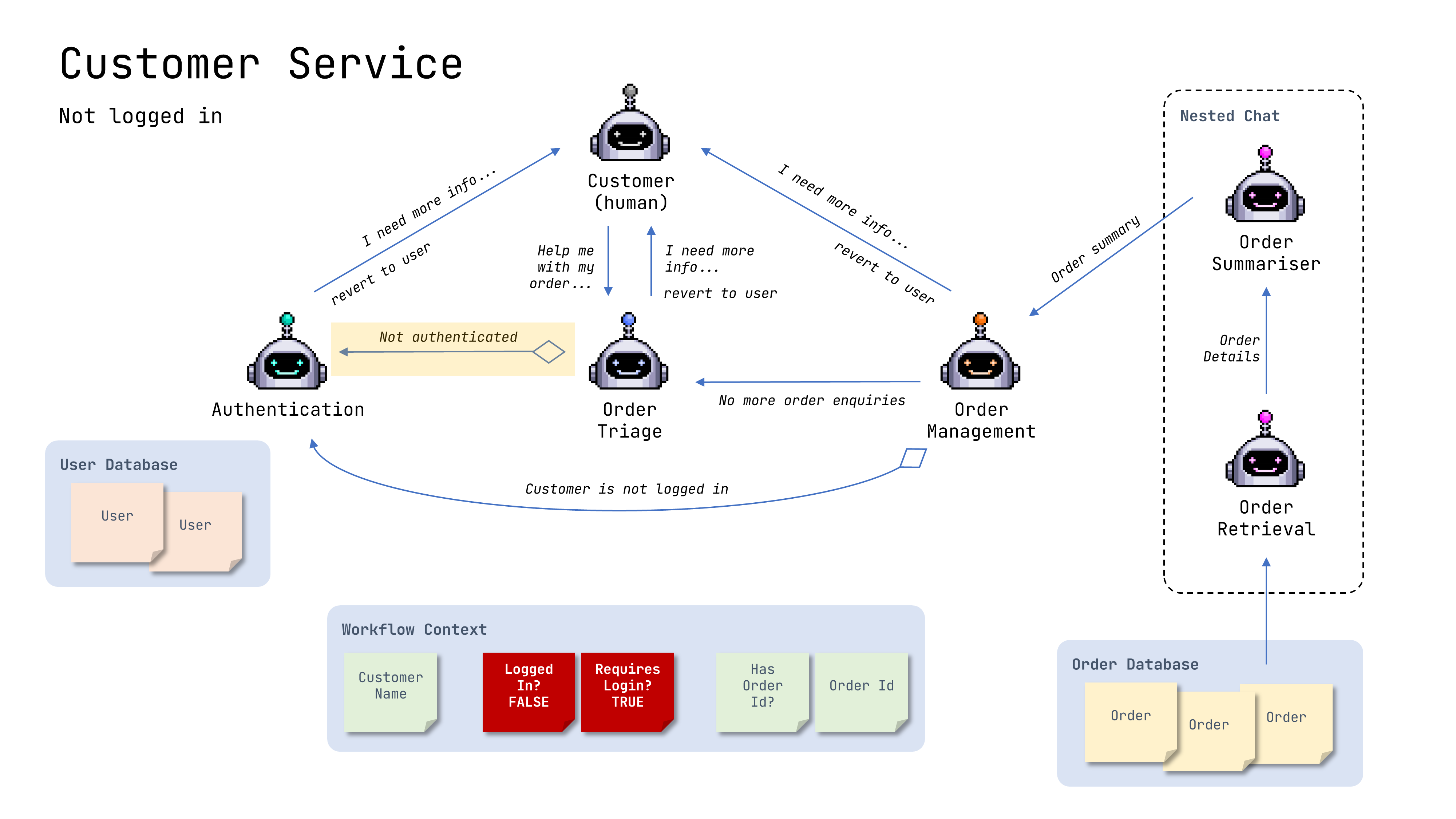
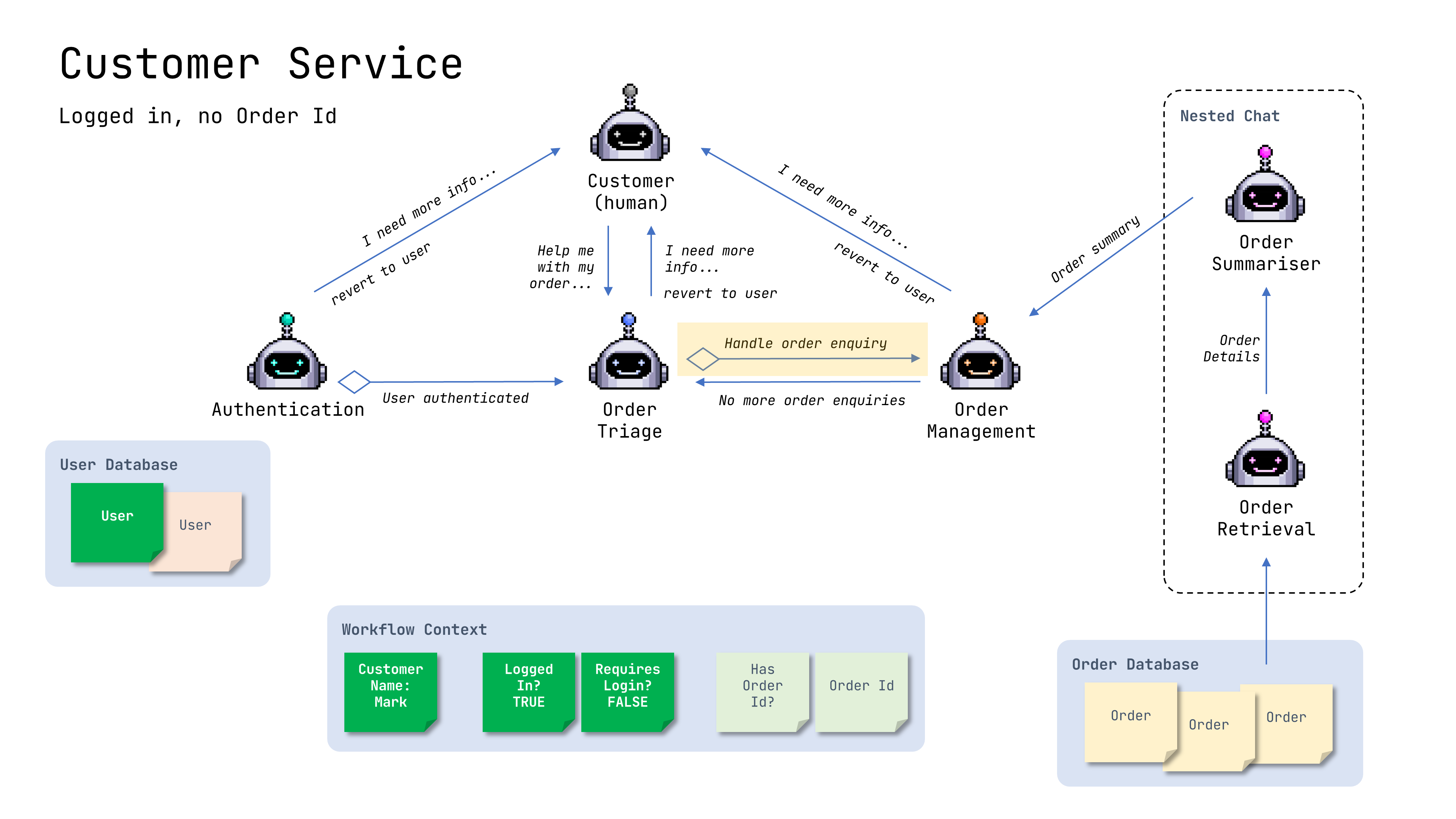
Controlling flow
When not logged in
When logged in but no order id
When logged in with order id
Agent state
Agent System Messages with context